Scheduling
Set up your rounds once and PanePal keeps track of who's due and when. Open the app in the morning and your day is laid out in order — mark each clean done as you go and the next one books itself.
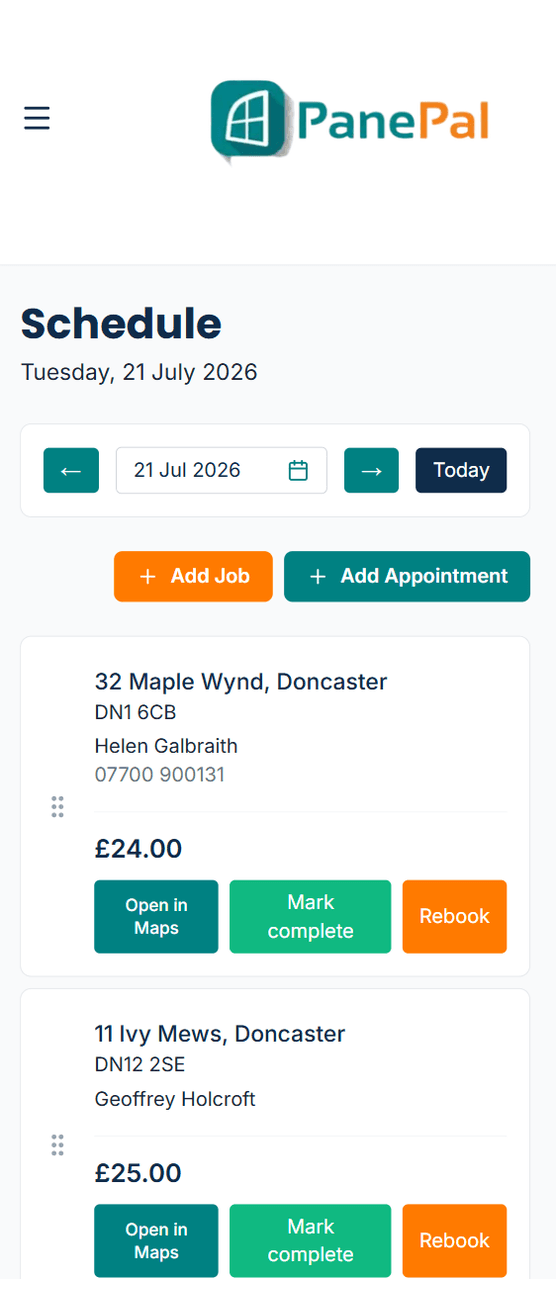
Today's jobs in order, with Maps, Mark complete and Rebook on each one.
Scheduling, step by step
Build your rounds
Group nearby customers into rounds, choose how often each round comes round — every 4 weeks, every 8 — and drag customers into the order you clean them.
Your day, in order
Each day's jobs, numbered in the order you'll do them, with the address, price and a button to open it in Maps. Add one-off jobs and quote appointments on top of the regular round.
Optimise your route (Premium)
Set where you start from and tap Optimise route. PanePal puts the day's cleans into the quickest driving order using real roads, so you spend less time in the van.
Mark complete and it rebooks itself
Tap Mark complete and the next clean is booked for that customer automatically, and the invoice is created — no re-entering anything.
Rain day? Rebook in two taps
Move one clean — or the whole day with Move all — to another date with a reason (weather, gate locked, customer rearranged), and choose whether each customer goes back to their usual round.
What it's worth
No more paper round book or wondering who you've missed. You always know who's due, and nothing slips through.
More of what PanePal does every day
Customer Management
All your customer info in one place.
Invoicing & Payments
Get paid faster, chase less.
Customer Messaging
Contact customers by text or by using our built-in chat feature.
Expenses
Track spend without a spreadsheet.
Your Own Website
A free web page for your business — or connect your own — that turns enquiries into customers.
Your PanePal Assistant
Tap the P button and PanePal tells you the most useful thing to do next — to grow the business or keep it organised.
Ready to grow your window cleaning business?
Start your 14-day free trial today — no card needed.