Invoicing & Payments
Every completed clean becomes an invoice automatically, sent to your customer by email or text. They can pay by card, Direct Debit or bank transfer — and you can see at a glance who still owes you.
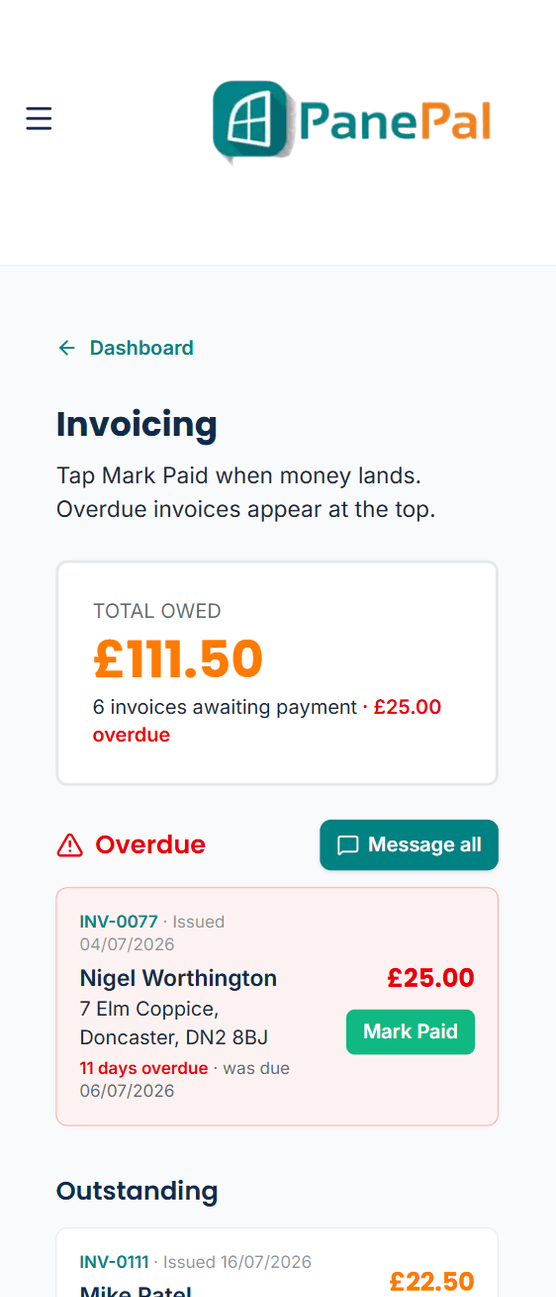
What you're owed, with overdue invoices at the top.
Invoicing & Payments, step by step
Invoices write themselves
Mark a job complete and the invoice is created with your logo, numbering and payment terms, then sent to the customer.
Let customers pay how they like
Connect Stripe for card payments or GoCardless for Direct Debit, or show your bank details for a transfer. Cash? Tap Mark Paid.
Overdue invoices come to the top
See your total owed and every late invoice first. Chase one customer or message everyone who's overdue in one go — or let PanePal send the reminders for you.
What it's worth
Less time chasing money, fewer customers who "forgot", and a clear picture of exactly what you're owed.
More of what PanePal does every day
Customer Management
All your customer info in one place.
Scheduling
Rounds, your day in order, and the quickest route, sorted.
Customer Messaging
Contact customers by text or by using our built-in chat feature.
Expenses
Track spend without a spreadsheet.
Your Own Website
A free web page for your business — or connect your own — that turns enquiries into customers.
Your PanePal Assistant
Tap the P button and PanePal tells you the most useful thing to do next — to grow the business or keep it organised.
Ready to grow your window cleaning business?
Start your 14-day free trial today — no card needed.